

capacitor-radar package on npm here.
Install
Install the package from npm:iOS
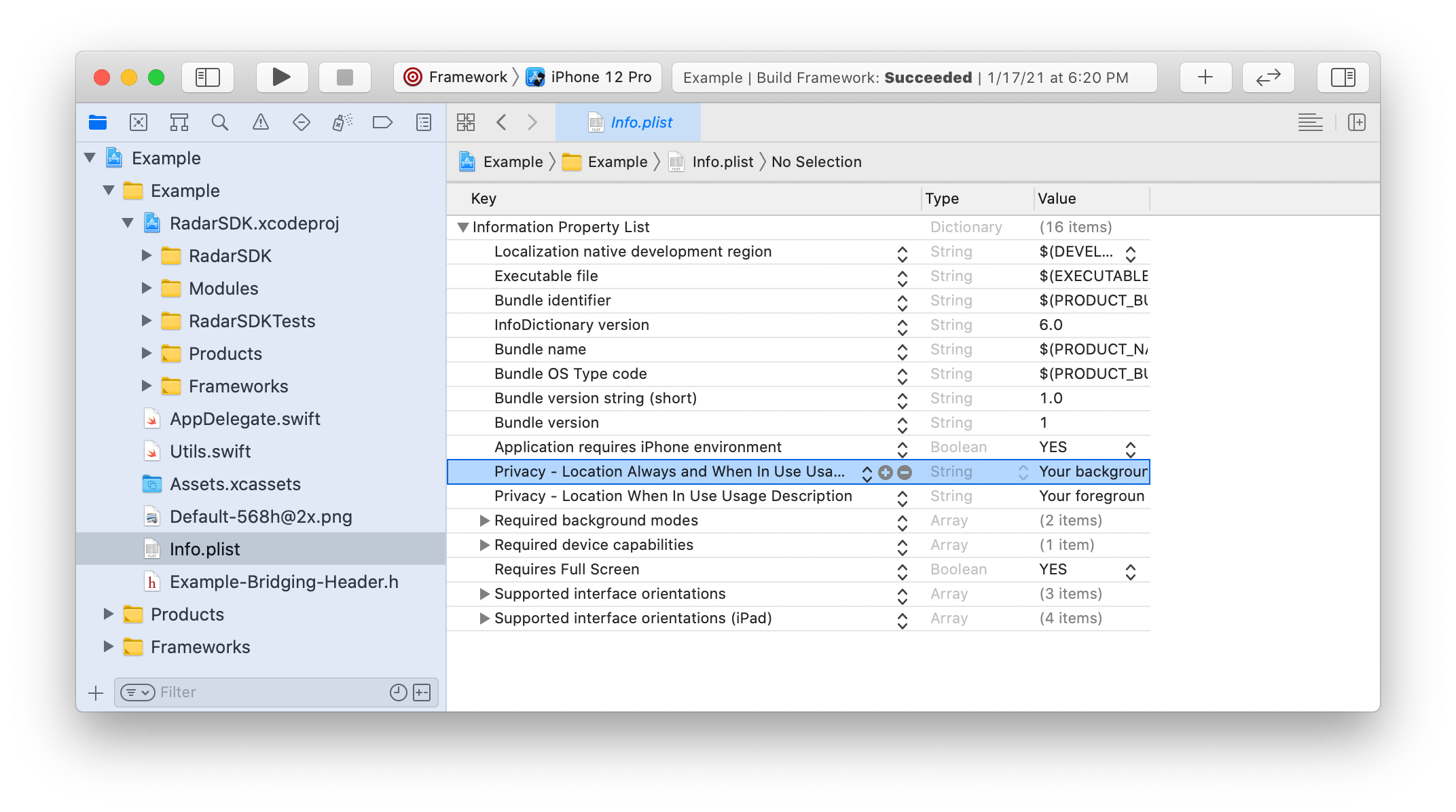
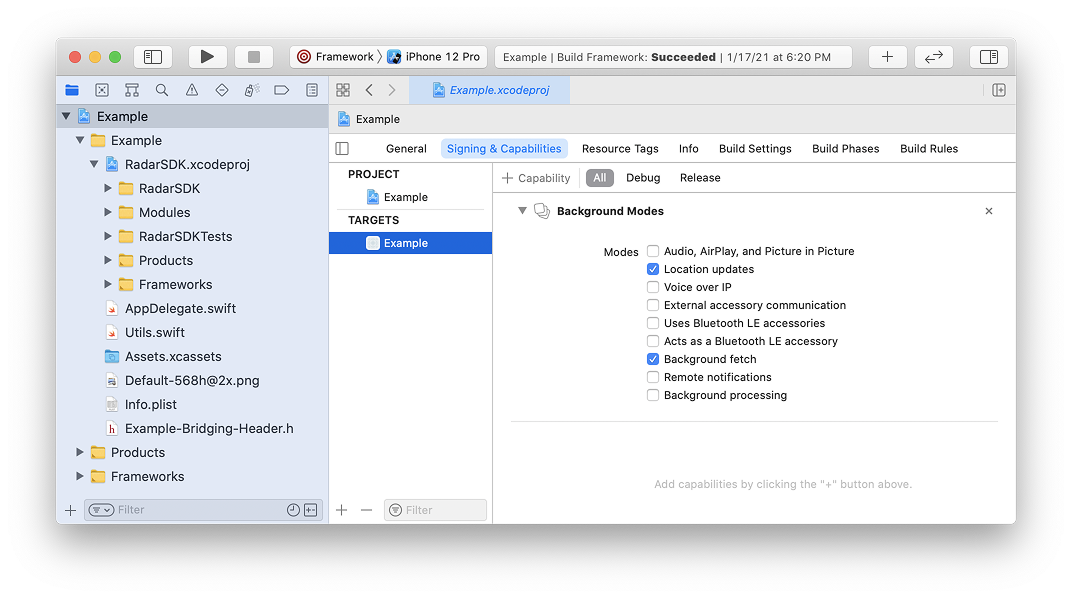
You must add location usage descriptions and background modes to yourInfo.plist. For foreground permissions, you must add a value for NSLocationWhenInUseUsageDescription (Privacy - Location When In Use Usage Description). For background permissions, you must add a value for NSLocationAlwaysAndWhenInUseUsageDescription (Privacy - Location Always and When In Use Usage Description). These strings are displayed in permissions prompts.
application:didFinishLaunchingWithOptions: in AppDelegate.swift, passing in your Radar publishable API key:
Android
You must add Google Play Services Location to your project (use version 21.0.1 or higher).radar-capacitor module’s build.gradle.
When upgrading the SDK, ensure the Android SDK version is updated to match the plugin’s pinned version. For details on the latest SDK releases, see the releases page on GitHub.
onCreate() in MainActivity.java, passing in your Radar publishable API key:
29 or higher, Radar also requires the ACCESS_BACKGROUND_LOCATION permission. You must add the ACCESS_BACKGROUND_LOCATION permission to your manifest manually:
Integrate
Import module
First, import the module:Identify user
To identify the user when logged in, call:userId is a stable unique ID for the user.
To set an optional dictionary of custom metadata for the user, call:
metadata is a JSON object with up to 16 keys and values of type string, boolean, or number.
Finally, to set an optional description for the user, displayed in the dashboard, call:
description is a string.
You only need to call these functions once, as these settings will be persisted across app sessions.
Learn about platform-specific implementations of these functions in the iOS SDK documentation and Android SDK documentation.
Request permissions
Before tracking the user’s location, the user must have granted location permissions for the app. To determine the whether user has granted location permissions for the app, call:result.status will be a string, one of:
GRANTED_BACKGROUNDGRANTED_FOREGROUNDNOT_DETERMINEDDENIED
background is a boolean indicating whether to request background location permissions or foreground location permissions.
Learn about platform-specific permissions in the iOS SDK documentation and Android SDK documentation.
Foreground tracking
Once you have initialized the SDK and the user has granted permissions, you can track the user’s location. To track the user’s location in the foreground, call:err will be a string, one of:
ERROR_PUBLISHABLE_KEY: SDK not initializedERROR_PERMISSIONS: location permissions not grantedERROR_LOCATION: location services error or timeout (10 seconds)ERROR_NETWORK: network error or timeout (10 seconds)ERROR_BAD_REQUEST: bad request (missing or invalid params)ERROR_UNAUTHORIZED: unauthorized (invalid API key)ERROR_PAYMENT_REQUIRED: payment required (organization disabled or usage exceeded)ERROR_FORBIDDEN: forbidden (insufficient permissions or no beta access)ERROR_NOT_FOUND: not foundERROR_RATE_LIMIT: too many requests (rate limit exceeded)ERROR_SERVER: internal server errorERROR_UNKNOWN: unknown error
Background tracking
On iOS and Android, once you have initialized the SDK and the user has granted permissions, you can start tracking the user’s location in the background. For background tracking, the SDK supports custom tracking options as well as three presets:EFFICIENT: A low frequency of location updates and lowest battery usage. On Android, avoids Android vitals bad behavior thresholds.RESPONSIVE: A medium frequency of location updates and low battery usage. Suitable for most consumer use cases.CONTINUOUS: A high frequency of location updates and higher battery usage. Suitable for on-demand use cases (e.g., delivery tracking) and some consumer use cases (e.g., order ahead, “mall mode”).
RadarDelegate on iOS, RadarReceiver on Android) or use Radar’s server-side integrations.
Mock tracking
On iOS and Android, you can simulate a sequence of location updates for testing. For example, to simulate a sequence of 10 location updates every 3 seconds by car from anorigin to a destination, we can call: